Hello everyone! In this write-up, I will discuss one of my findings about a Self-Reflected XSS (Cross-Site Scripting) vulnerability that I successfully escalated into a valid finding under a bug bounty program by chaining it with CSRF (Cross-Site Request Forgery).
This write-up explains how you can chain these types of vulnerabilities to turn a Self-XSS into a valid security finding instead of ignoring it.
I hope you enjoy this write-up!
🎯 Run Your Bug Bounty Program with Cyberbay — Use My Referral Code
If you’re part of a company or security team planning to launch a bug bounty program, Cyberbay is a fantastic platform to consider. I’ve had a great experience working with them as a researcher, and I highly recommend their platform for managing security reports and collaborating with ethical hackers.
As a valued member of the Cyberbay community, I’m excited to share an exclusive referral code for companies: 👉 Use referral code JIVAN2025 during registration to receive 15% off your company’s first purchase on Cyberbay.
🔐 Ready to get started? Register your organization here: https://community.cyberbay.tech/signup/corporate
Whether you’re a startup or a large enterprise, launching a bug bounty program is a smart step toward strengthening your security. Don’t miss this opportunity to launch your program with a discount and the support of a growing security community!
Have questions about the process? Feel free to reach out — I’m happy to help you get started.
About the Target
Now, let me explain a little about this target.
[Redacted Dot Com] is one of my very old targets, where I have previously reported numerous security issues. I have been continuously hunting on this target and monitoring the company’s assets for more than a year.
For security reasons, I cannot disclose the company’s actual name in this write-up, so I will refer to the target company/domain as [Redacted Dot Com].
Last month, I decided to review this company’s assets once again. I always keep an eye on the domains and assets of companies I have previously tested. I never completely ignore my previously tested targets, because even after finding and reporting security issues, there is always a possibility of discovering something new.
Whenever I revisit and re-verify an old target, I often find new security issues that I might have missed during my previous testing.
That’s why revisiting old targets is part of my regular bug bounty hunting routine.
So, I opened the [Redacted Dot Com] target and, after spending a few minutes exploring it, I spotted an interesting new feedback form on one of the target’s domains.
This was something new to me because I had already monitored and tested this target carefully in the past. I noticed that the form included several fields, such as Name, Email, Phone Number, and other details, as you can see in the attached screenshot.
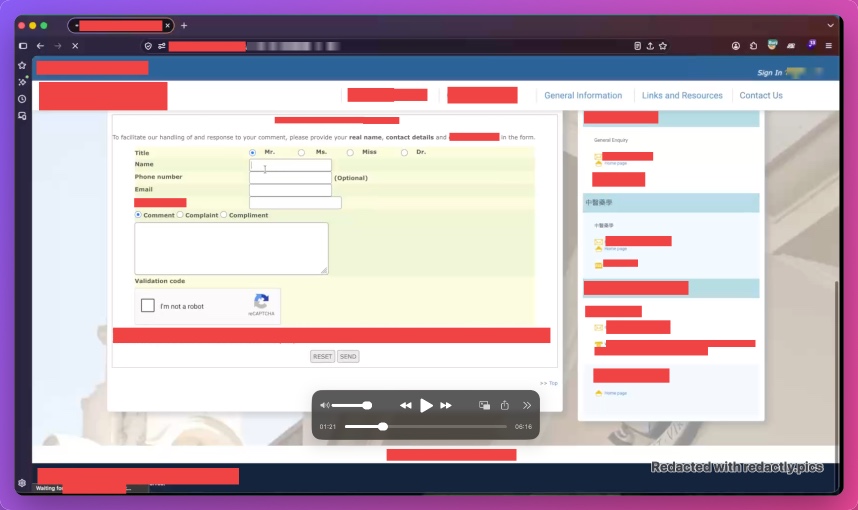
Since this feedback form was new to me, I decided to take a closer look at how it worked and investigate whether it could lead to any potential security issues.
After that, I decided to test the feedback form by filling in the fields with HTML and XSS payloads to check how the application handled the submitted input.
Once I had filled in the form, I also completed the CAPTCHA and submitted the feedback, as you can see in the attached screenshot.
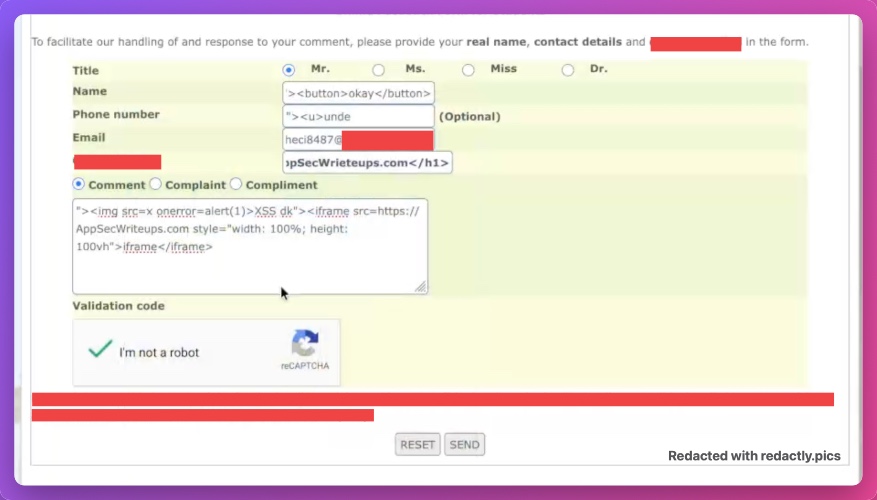
In the input fields, I used some basic XSS and HTML payloads, such as XSS test payloads, <button>, <u> (underline), and <iframe> tags.
Advanced Real Bug Bounty Case Studies – Volume 1
Learn bug bounty hunting through real vulnerability case studies. Discover how XSS, HTML Injection, IDOR, and Broken Access Control vulnerabilities are identified, validated, and responsibly reported using practical, real-world examples instead of intentionally vulnerable labs.
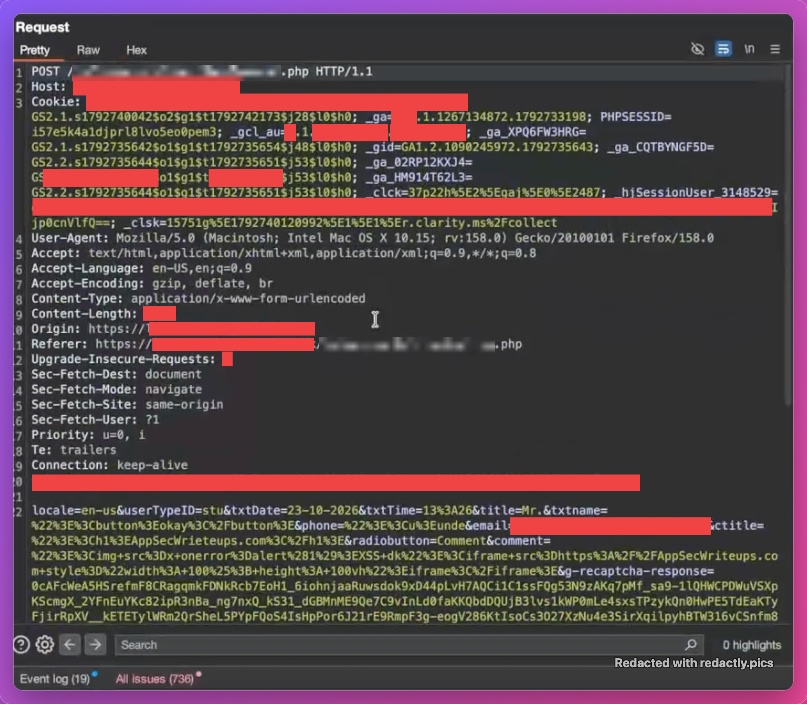
After filling in the fields, I intercepted the submission request using Burp Suite. I also captured and inspected the corresponding API request to understand how the backend processed the submitted data and to check for potential security issues, such as IDOR or anything that could impact the CIA triad (Confidentiality, Integrity, and Availability).
However, the API request did not contain any sensitive information. So, I forwarded the request and observed what happened next.
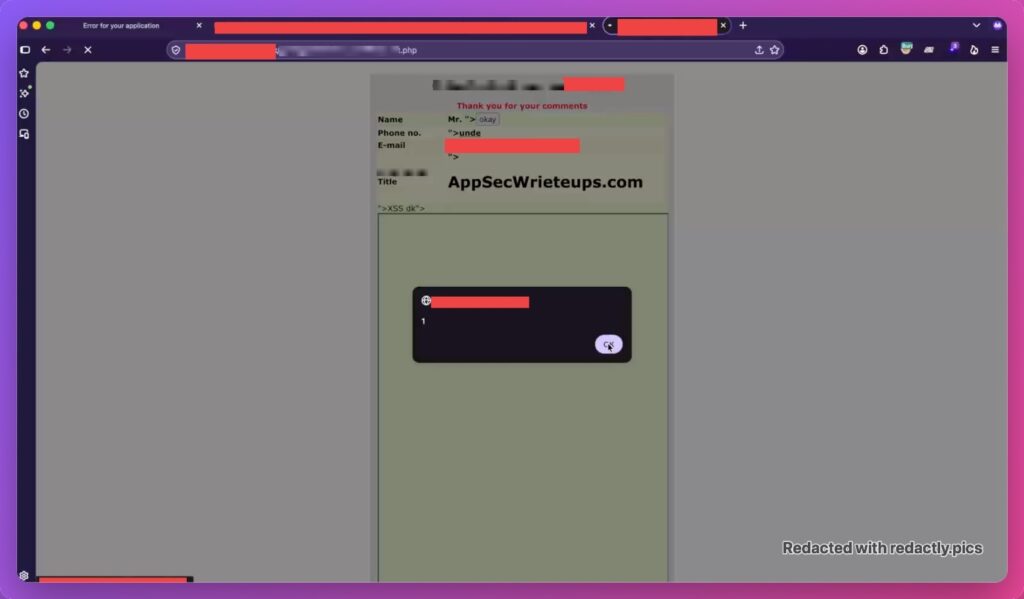
Interestingly, after the request was processed, the application displayed the submitted content back on the screen, triggering XSS pop-ups.
After seeing that the submitted XSS payload was executed and the HTML payloads were rendered in the web application, I started thinking about how I could escalate this Self-XSS into a valid XSS vulnerability.
As we know, Self-XSS is generally not considered a valid security issue by most bug bounty programs because the impact is limited to the user who submits the payload. In this case, the vulnerability I had discovered could not be triggered on a victim’s side without requiring the victim to interact with the feedback form themselves.
So, I started looking for a way to trigger the XSS through the API request instead.
First, I simply copied the complete API request URL and opened it in a new browser tab to see whether I could trigger the behavior directly. However, that approach did not work.
Next, I decided to use the already captured API request to generate a CSRF PoC.
I successfully generated the CSRF PoC for this API request, which gave me another approach to investigate whether I could escalate the Self-XSS into a valid security finding.
After that, I opened the generated CSRF PoC in another browser and noticed that the XSS payload was not triggered.
I decided to review the API request once again to understand why the CSRF attack was not working. During this review, I noticed that the request contained a CAPTCHA verification mechanism.
So, I started experimenting with the CAPTCHA parameter to understand how the application validated it.
First, I completely removed the CAPTCHA parameter from the request and sent it through Burp Suite. However, the application returned the same error response, confirming that CAPTCHA verification was enforced by the application.
Next, I tried replacing the original CAPTCHA value with random text of the same length and sent the request again. Unfortunately, the request still failed.
I also tried passing a null value for the CAPTCHA parameter, but the application continued to reject the request.
At this point, I realized that the CAPTCHA verification mechanism was preventing me from triggering the CSRF-based XSS on another user’s browser. This made the escalation considerably more challenging.
After completing all these tests, I confirmed that the web application validates the CAPTCHA for every API request. I also noticed that once an API request is successfully processed, the corresponding CAPTCHA becomes invalid and cannot be reused.
After confirming this behavior, I decided to try one final approach.
I captured a fresh API request by submitting the feedback form again. This time, I intercepted the request using Burp Suite and generated a new CSRF PoC from it.
However, instead of forwarding the intercepted request to the server, I dropped the request.
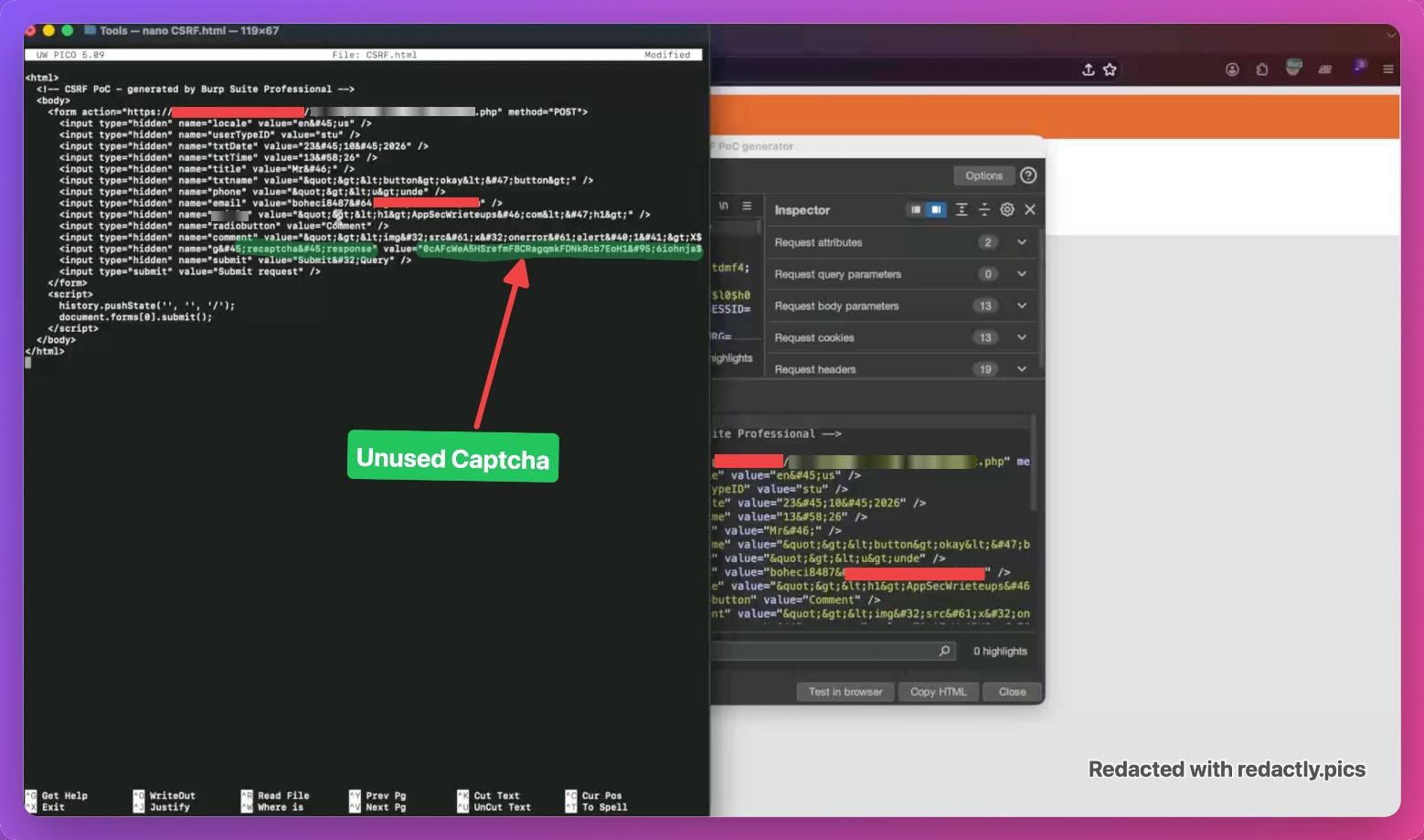
The reason behind this was simple: I wanted to generate the CSRF PoC without consuming the CAPTCHA value. Since I dropped the request, the server never processed it, meaning the CAPTCHA was not validated or consumed by the server.
As you can see in the attached screenshot, I successfully generated the CSRF PoC using the captured request without submitting it to the server.
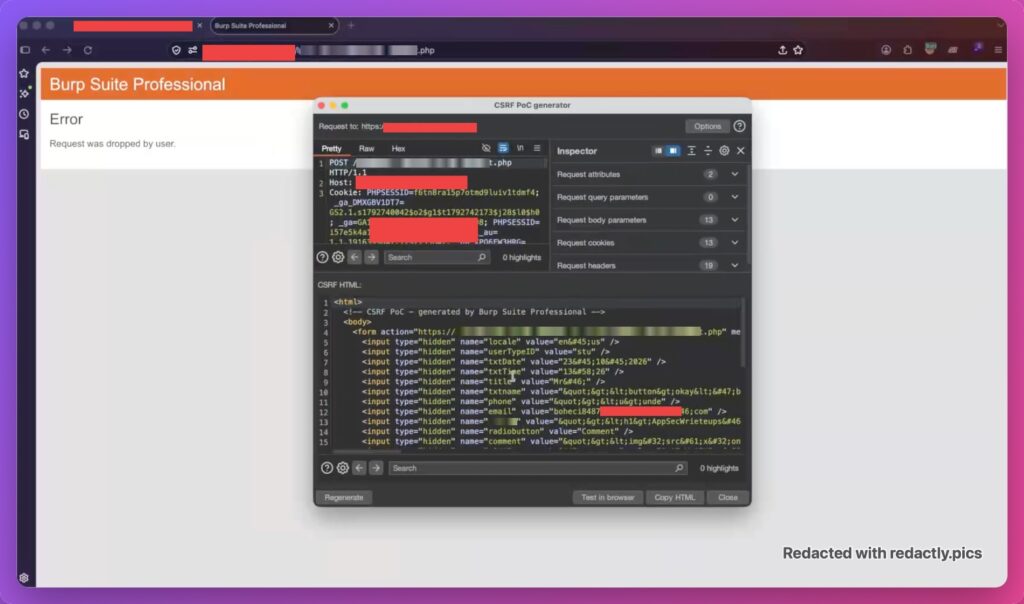
CSRF PoC with Unused Captcha
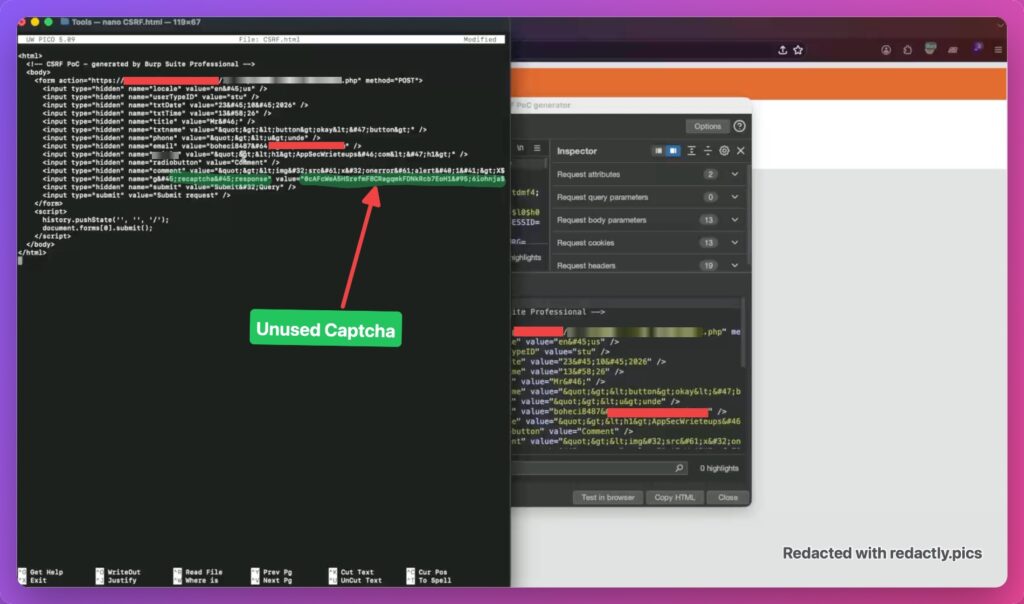
After that, I saved the generated CSRF PoC as an HTML file (.html). The file contained the feedback form parameters, including the HTML and XSS payloads, along with the previously unused CAPTCHA value.
Advanced Real Bug Bounty Case Studies – Volume 1
Learn bug bounty hunting through real vulnerability case studies. Discover how XSS, HTML Injection, IDOR, and Broken Access Control vulnerabilities are identified, validated, and responsibly reported using practical, real-world examples instead of intentionally vulnerable labs.
Next, I opened the saved CSRF PoC in my browser to test whether the attack would work.
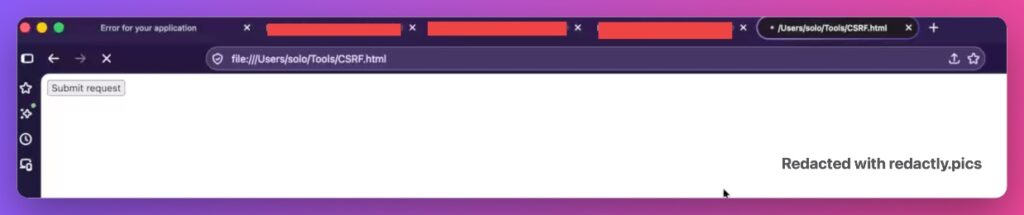
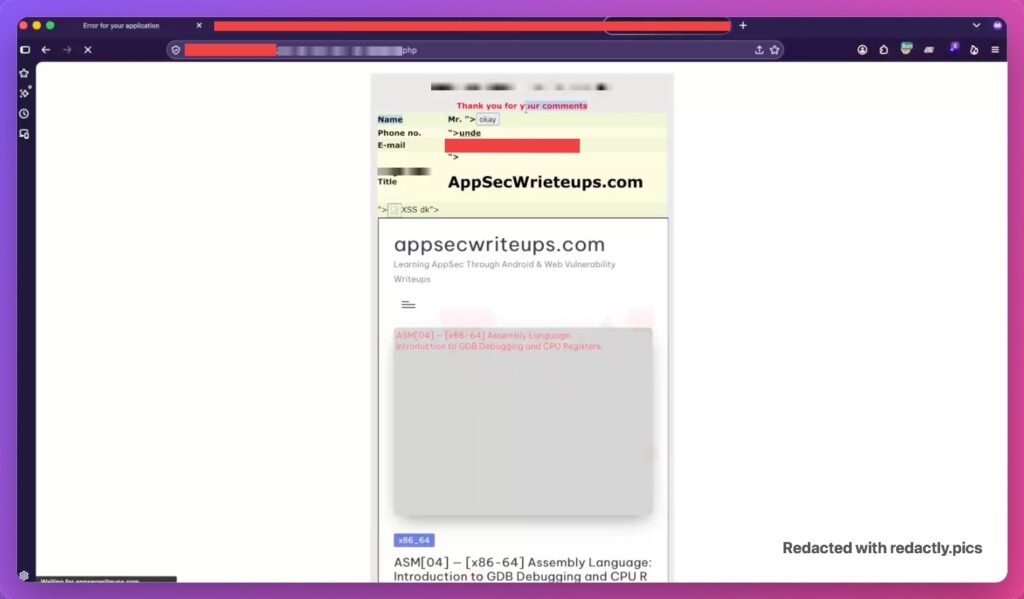
To my surprise, the application successfully executed the submitted XSS payloads!
This confirmed that the CSRF PoC was working as expected and that I had successfully found a way to trigger the XSS without manually submitting the feedback form.
By chaining CSRF with Self-XSS, I was able to escalate the issue into a valid XSS finding.
You can see the successful XSS execution in the attached screenshot.
How I Escalated Self-XSS into a Valid Security Finding
After completing all the tests and confirming the behavior of both Self-XSS and CSRF, I successfully managed to escalate the Self-XSS into a valid XSS finding on [Redacted Dot Com].
Now, let me explain this issue in more detail.
As you have read throughout this write-up, the initial vulnerability was Self-XSS. In a typical Self-XSS scenario, an attacker needs to convince the victim to manually enter an XSS payload into their browser console or an input field to trigger the JavaScript execution.
Obviously, this is not a practical attack scenario because convincing a victim to manually execute an attacker’s payload is difficult. This is also why most bug bounty programs do not accept standalone Self-XSS reports.
When reporting an XSS vulnerability, companies generally want to understand how an attacker can deliver the payload to a victim and trigger the vulnerability without requiring the victim to manually inject or execute the payload themselves.
In my case, the initial issue was not a typical Stored XSS or Reflected XSS scenario. The XSS payload was executed only when a user submitted it through the feedback form. Without an additional attack vector, I had no practical way to deliver this payload to another user.
That’s why I decided not to report it as a standalone Self-XSS vulnerability. Instead, I continued investigating whether I could escalate its impact.
During my testing, I discovered that the web application was also vulnerable to Cross-Site Request Forgery (CSRF). By chaining CSRF with the existing Self-XSS vulnerability, I found a way to deliver the malicious feedback form submission to another user’s browser without requiring them to manually enter the XSS payload.
This was the turning point of my research!
Now, an attacker only needs to deliver the generated CSRF PoC to a victim. When the victim visits the attacker’s webpage and triggers the CSRF request, the target application processes the malicious feedback submission and executes the XSS payload in the context of [Redacted Dot Com].
As demonstrated in the screenshots above, I was also able to load my own website inside an iframe through the XSS payload, making the resulting content appear within the target application’s page.
By chaining Self-XSS with CSRF, I successfully turned an otherwise limited Self-XSS scenario into a practical attack against another user.
I hope this explanation clears up any doubts about how I identified, tested, and escalated this issue.
After completing all the testing and confirming the vulnerability, I submitted a detailed security report to the company.
Within a few hours, the company accepted my report as a Medium-severity security issue and deployed a fix based on my findings.
And that’s how I successfully escalated a Self-XSS vulnerability into a valid security finding by chaining it with CSRF.
I hope this write-up helps you understand how to investigate and escalate similar issues instead of immediately ignoring them as standalone Self-XSS.
Thanks for reading! I hope you enjoyed this write-up.
🙏 Thank You for Reading!
I hope you found this write-up on escalating Self-XSS into a valid Medium-severity XSS vulnerability by chaining it with CSRF and analyzing CAPTCHA validation insightful and helpful.
My aim is to share practical, real-world bug bounty experiences and demonstrate why we should never immediately ignore a Self-XSS finding. Sometimes, deeper investigation and chaining multiple security weaknesses can turn an otherwise limited issue into a valid security finding.
If you enjoyed this write-up or learned something new, stay tuned — I’ll be sharing more real-world Web, Android, and iOS vulnerability write-ups soon!
Feel free to share your thoughts or drop any questions in the comments. Until next time, keep investigating, think beyond the obvious, and happy hunting! 🎯💻