In this writeup, I will explain one of my security findings involving an Improper Access Control vulnerability.
The vulnerability allowed an unprivileged user without the User Management role to access User Management functionality through API endpoints.
By exploiting this issue, I was able to view all users within the organization, including their email addresses, user IDs, and other sensitive information. This functionality should only be accessible to Administrators or users with the User Management role.
I hope this writeup helps you understand how to identify similar security issues during your bug bounty hunting.
Advanced Real Bug Bounty Case Studies – Volume 1
Learn bug bounty hunting through real vulnerability case studies. Discover how XSS, HTML Injection, IDOR, and Broken Access Control vulnerabilities are identified, validated, and responsibly reported using practical, real-world examples instead of intentionally vulnerable labs.
Before We Get Into the Writeup
Before jumping into the vulnerability, I want to share some context about my hunting approach.
This was a wildcard target, and I spent more than one week hunting across its scope. During that time, I manually tested 700+ domains and subdomains.
I’m sharing this because many hunters don’t check every domain when testing wildcard targets. Instead, they often focus only on interesting subdomains or rely heavily on automated tools to identify potential vulnerabilities. There is nothing wrong with that approach, but sometimes manual testing across every domain can lead to very good findings.
In this case, the target was well-maintained and had a strong security posture. I had already reported a few security issues across different subdomains before discovering this vulnerability.
My recommendation is simple: Don’t ignore less interesting domains when hunting on wildcard targets. Try to explore and manually test each domain instead of focusing only on the obvious ones.
This has always been one of my favorite approaches to bug bounty hunting, and this isn’t the first time I’ve tested a wildcard scope this extensively.
I hope this gives you a better understanding of my hunting approach. I’ll share more stories about similar wildcard hunting experiences in upcoming writeups.
While testing this target, [Redacted Dot Com] (I’m not disclosing the actual company name, so I’ll refer to it as [Redacted Dot Com] throughout this writeup), I came across one of its domains that provides a platform where users can create accounts to manage company contracts, request quotations for their projects, and perform similar activities.
I started testing this web application to understand its functionality and identify potential security issues.
As part of the testing process, I created a test account with Administrator privileges. You can see the account creation process in the attached PoC screenshot.
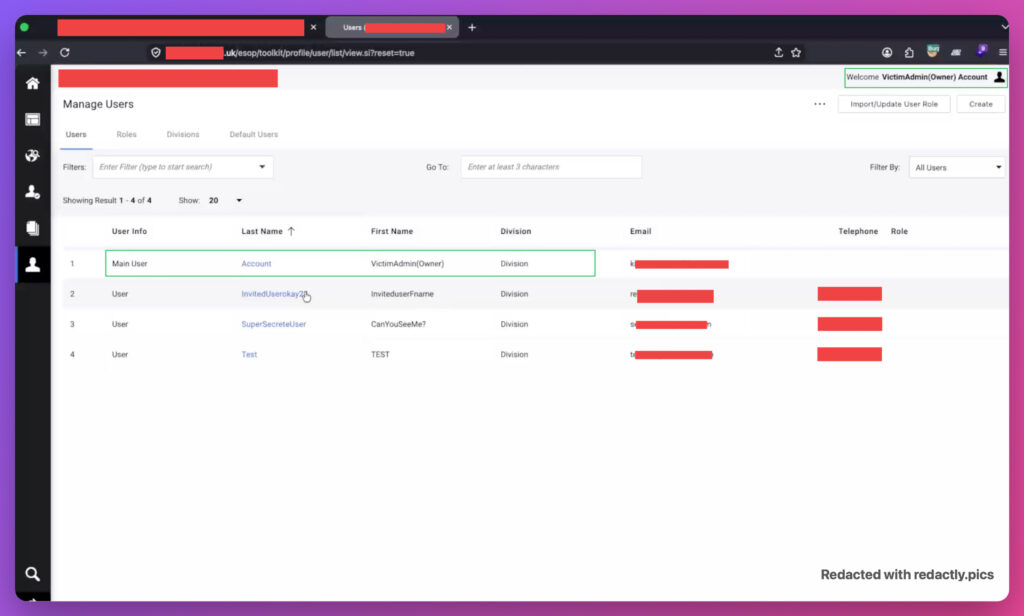
After creating the admin account, VictimAdmin (Owner), I also invited a few users to this organization. As you can see in the screenshot above, I invited InvitedUserokay23 as the attacker user, to whom I granted no User Management privileges.
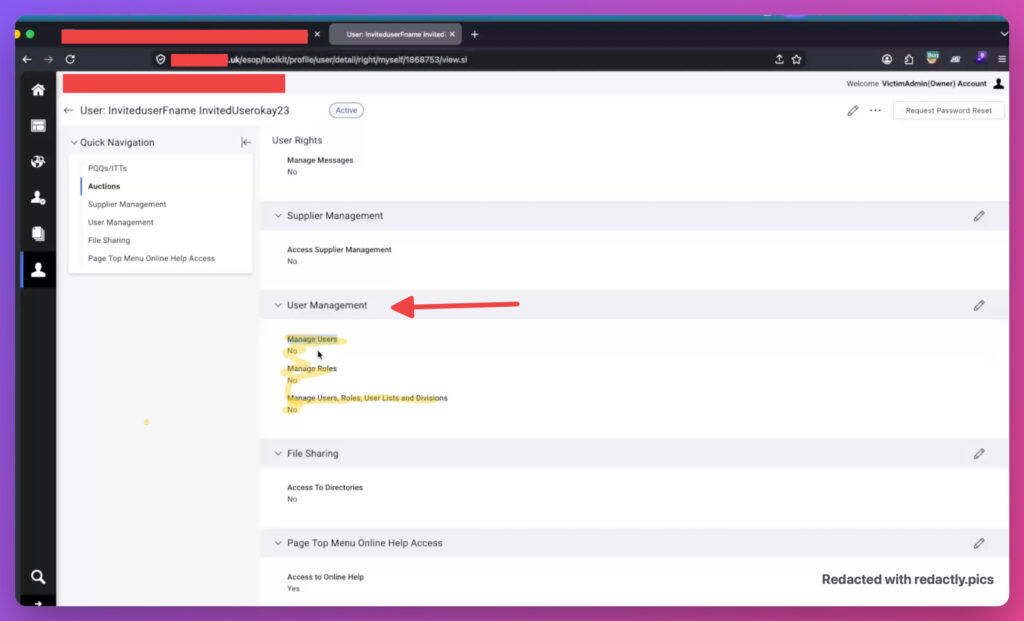
As you can see in the screenshot above, InvitedUserokay23 has not been granted any User Management permissions. All permissions are set to No, which means this user should not be able to access this functionality.
Advanced Real Bug Bounty Case Studies – Volume 1
Learn bug bounty hunting through real vulnerability case studies. Discover how XSS, HTML Injection, IDOR, and Broken Access Control vulnerabilities are identified, validated, and responsibly reported using practical, real-world examples instead of intentionally vulnerable labs.
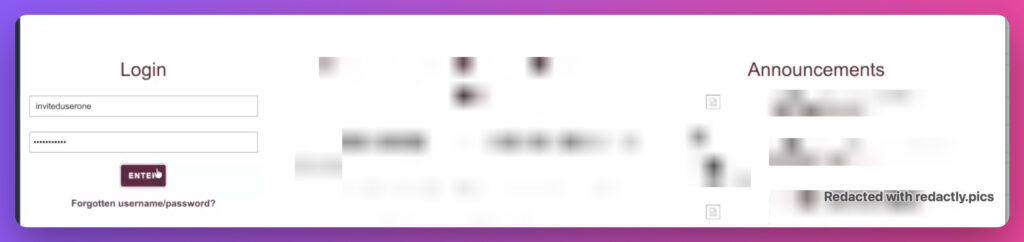
After completing this configuration, I switched to the InvitedUserokay23 account by logging in through a new browser tab, as you can see below.
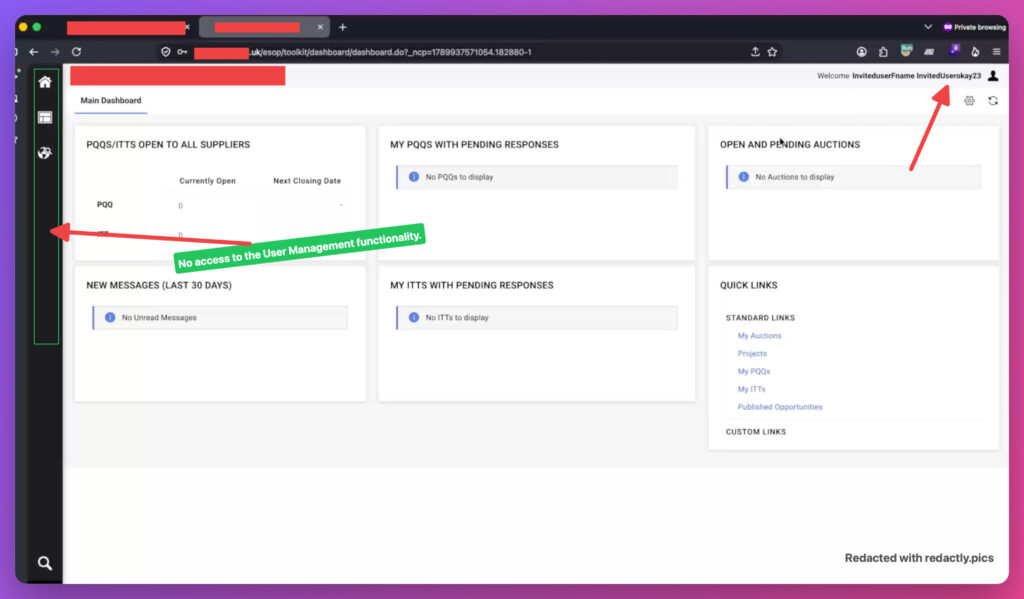
Once I logged in to the attacker account, InvitedUserokay23, you can see that there is no access to the User Management functionality.
As shown in the attached screenshot, the User Management option is not available in the attacker’s account. If you compare this with the earlier administrator screenshot, you can see that the User Management option is visible there.
I had already verified that this functionality is only visible and accessible to Administrators and users with the User Management role set to Yes. See the attached screenshot showing the User Management functionality.
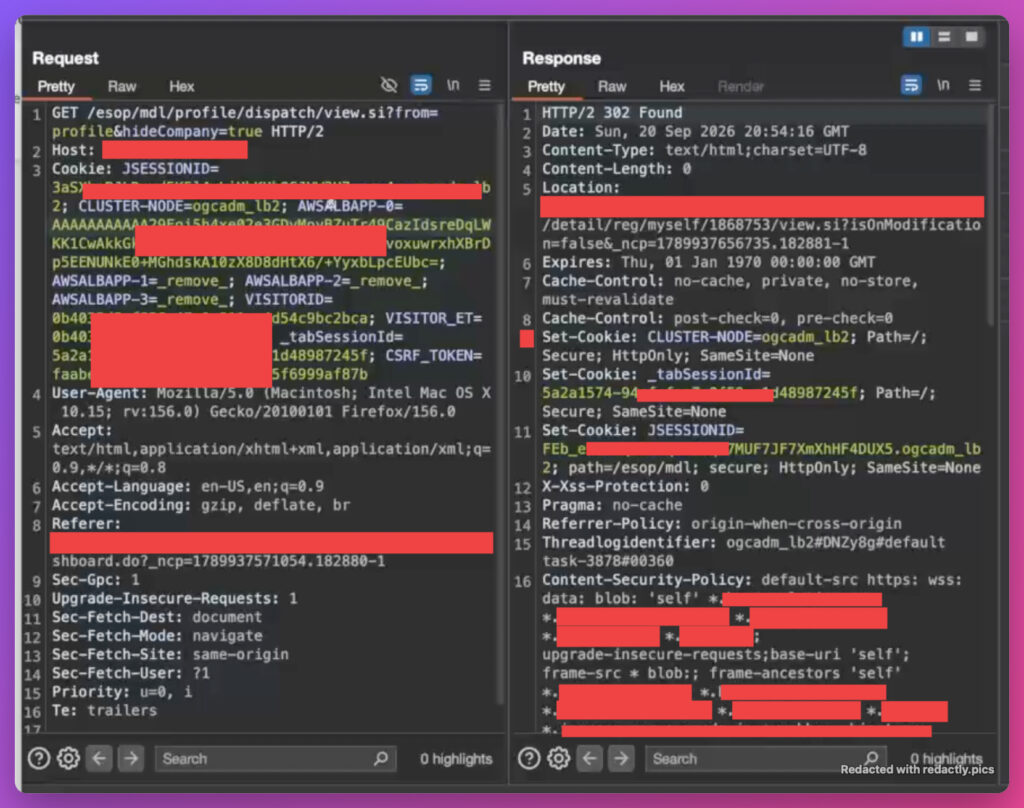
After this, I simply captured random API requests from the attacker user’s account using Burp Suite. I then tested each API request by modifying the API paths in Burp Suite, covering different functionalities one by one. However, nothing worked because the web application had strong access controls in place.
Then I came across the User Management functionality I mentioned earlier. I tested every API request related to this functionality, but none of them worked.
However, I eventually came across one particular functionality where users with User Management permissions could search using a username, user ID, or email address. This functionality returned information about all users matching the supplied search keyword.
The API request was:
GET /esop/toolkit/profile/user/list/searchAndGo.si?json=true&value=**&start=0
Here, the value parameter contains the search keyword. Using ** returns all matching user records without specifying a particular search keyword.
I then replaced this API request with the corresponding request from the attacker user’s account, even though the attacker user did not have access to the User Management functionality.
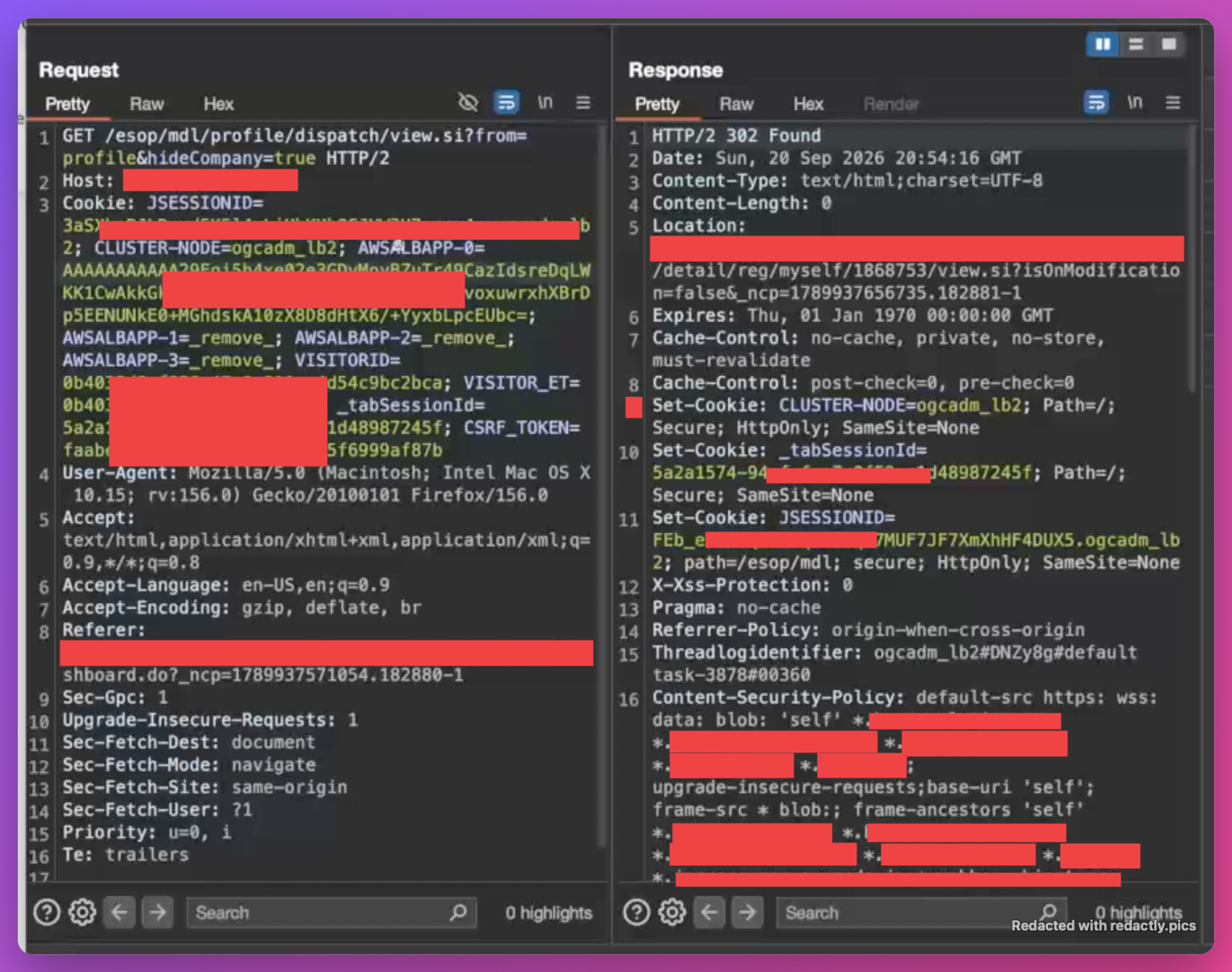
See the attached screenshot showing the API request I randomly captured from the attacker user’s account.
After that, I replaced the above API path with the vulnerable API endpoint:
GET /esop/toolkit/profile/user/list/searchAndGo.si?json=true&value=**&start=0
I then sent the modified API request, which successfully returned information about all users in the organization. This information should only be accessible to Administrators and users with the required User Management privileges.
Advanced Real Bug Bounty Case Studies – Volume 1
Learn bug bounty hunting through real vulnerability case studies. Discover how XSS, HTML Injection, IDOR, and Broken Access Control vulnerabilities are identified, validated, and responsibly reported using practical, real-world examples instead of intentionally vulnerable labs.
However, the attacker user was able to access this information despite having no User Management permissions, which demonstrates an Improper Access Control vulnerability.
See the attached screenshot showing the successful exploitation of this issue.
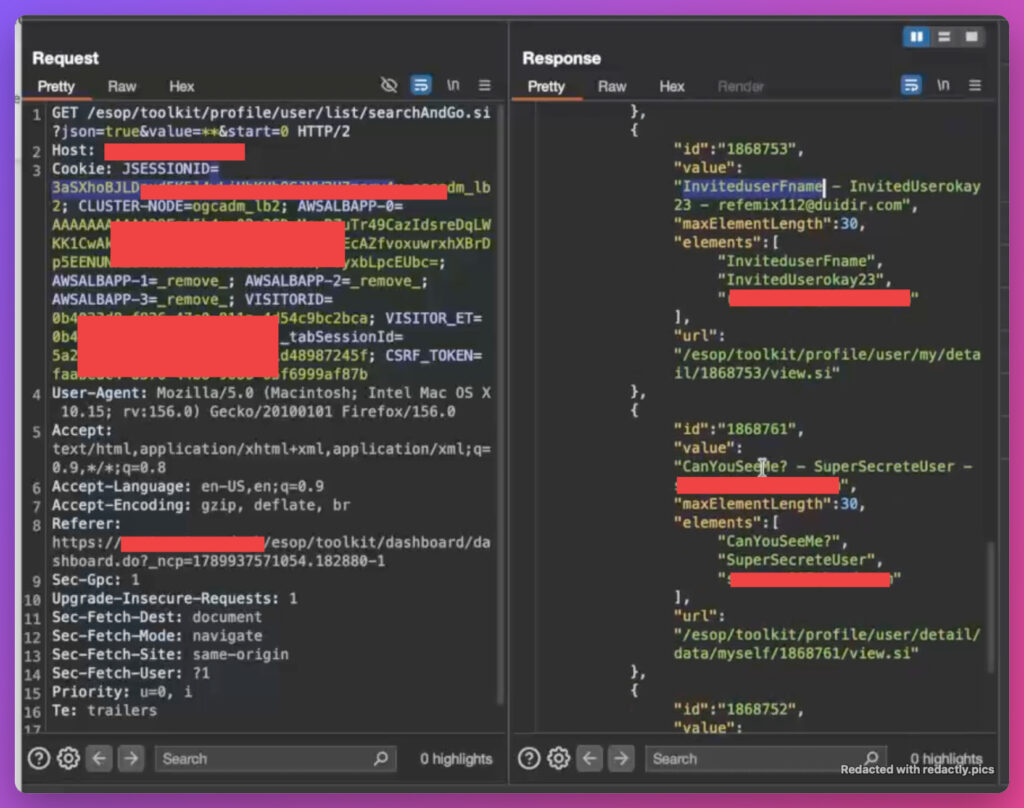
As you can see in the screenshot above, I was successfully able to exploit this vulnerability, which allowed me to access all user information within the organization despite having no privileges for the User Management functionality. This confirmed the vulnerability.
After that, I prepared a detailed vulnerability report along with a video PoC and submitted it to the company.
A few days later, I reviewed the company’s response, where they confirmed the vulnerability and accepted it as a Medium-severity finding.
After a few weeks, the company deployed a fix for this issue. The vulnerability is no longer reproducible. The API endpoint now properly verifies user permissions before returning sensitive information and responds with 403 Forbidden when an unauthorized user attempts to access it.
This is how I tested a large number of wildcard domains and eventually discovered this security issue.
I hope this writeup helps you identify similar security issues during your bug bounty hunting.
If you have any questions, feel free to leave a comment below with your details or contact me via email.
🙏 Thank You for Reading!
I hope you found this write-up on exploiting an Improper Access Control vulnerability to access User Management functionality and retrieve sensitive user information without the required privileges insightful and helpful.
My aim is to share practical, real-world bug bounty experiences and demonstrate why we should never rely only on interesting subdomains or automated tools when hunting on wildcard targets. Sometimes, manually exploring every domain and testing individual functionalities can lead to valuable security findings, even on well-secured applications.
If you enjoyed this write-up or learned something new, stay tuned — I’ll be sharing more real-world Web, Android, and iOS vulnerability write-ups soon!
Feel free to share your thoughts or drop any questions in the comments. Until next time, keep exploring, test beyond the obvious, and happy hunting! 🎯💻